




Ours, built in
A team that knows video.
Hand a big job to a specialist: a story editor, a motion designer, a copywriter, a reviewer and more. Skills hold the know-how on hooks, pacing, captions, mixing and each platform's specs.
 The AI video editor for Mac and Windows
Describe the edit and KorvAI makes it on a real timeline, with the AI tool you already use. One click undoes it if you change your mind.
Available now for Mac Windows Coming soon
Play it, drag clips, or ask the AI for an edit
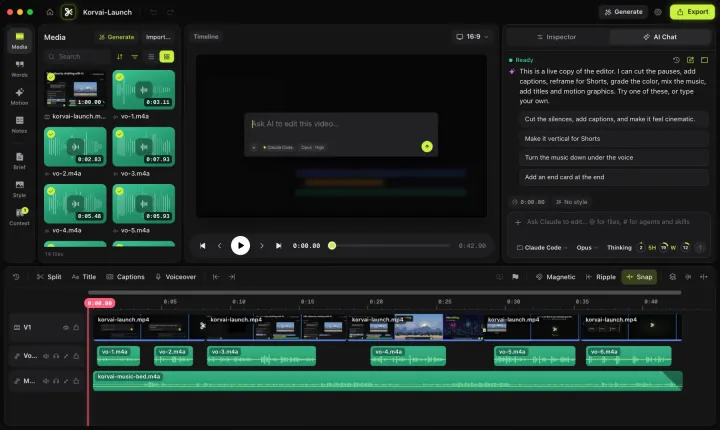
Tap Full screen for a bigger view of the editor.
Open this page on a Mac, PC or iPad to try the live editor.
KorvAI starts the coding agent you already use, signed in with your own plan. There is no second AI bill, and KorvAI never resells usage.

Selected tool
 Claude CodeClaude Code
>
Context used
0%Claude Code
0%
0%
A meter in the chat shows how much of your plan each video takes. Example readout, not your real usage.
Import clips, photos and audio. Choose one of 14 looks, or drop in reference images, GIFs and links so the AI matches your style.
Ask for a first cut, captions, music or a vertical version. The AI edits the real timeline and checks its own frames as it works.
Trim and move clips on the real timeline, or undo a whole AI turn in one click. A check runs before export, then it's out in 4K or straight to YouTube.
Agents and skills
KorvAI comes with 8 specialist agents and 9 editing skills, ready from the first launch. Already built your own in Claude Code or Codex? Import them in a click, or drop in a file, folder or .zip.
Ours, built in
Hand a big job to a specialist: a story editor, a motion designer, a copywriter, a reviewer and more. Skills hold the know-how on hooks, pacing, captions, mixing and each platform's specs.
Yours, brought in
Connect Claude Code or Codex and KorvAI offers the agents and skills you already have. Or import agent files, skill folders, a plugin or a .zip.
Type # in the chat to hand a job to an agent or load a skill.
Each one is a plain file. Edit it, turn it off, restore the original, or write a new one.
Agents work in a fresh context and report back. The chat makes the edits on your timeline.
Agents and skills run in chats that use Claude Code, including skills you import from Codex.
So the thing I learned is that the first three seconds decide everything. If people don't feel it right away, they're gone.
Delete a sentence in the transcript and the clip goes with it. Filler words and long pauses go in one click.

Word-by-word captions that follow every cut, in four presets you can restyle.
Every AI turn is one step in history. Keep it, or roll it all back in one click.

Faces stay in frame when a 16:9 shot becomes 9:16 or 1:1.
Voice cleanup, music that ducks under speech, and exports leveled to −14 LUFS.
Multitrack, keyframes, speed and reverse, freeze frames, compound clips, markers and J, K, L playback.
Projects are plain folders on your disk. No cloud project storage, no upload step, nothing to sync.
Coming soon
Chat editing, the timeline, captions, agents and skills, and export.
The specialist agents taking on one job together, handing work to each other in a single chat.
Generate shots, voiceovers, music and recurring characters with your own provider keys.
Captions and hashtags for each platform, a content calendar and scheduled posting.
KorvAI on Windows PCs, with the same chat editing and timeline.
7days
$100
$50once, lifetime license
Prices in USD. Pay once: no subscription, no hidden fees. Checkout by Dodo Payments. Your AI subscription is billed separately by its provider.
Everything you need to know before you buy.
$50, paid once, for a lifetime license that covers one person on one computer, a Mac or a Windows PC. A 7-day free trial includes every feature; enter your email to start it, no card needed.
Buy a license to keep editing. Your projects are plain folders on your Mac, so they stay yours either way.
No. One license works on one computer, a Mac or a Windows PC, not both. You can move it to another computer when you switch, even from a Mac to a Windows PC. If you need more, email us.
Email us within 14 days of buying and we'll refund you in full. No questions asked.
No. You pay once and keep using it, with no renewals and no monthly fee. Try it free for 7 days first, no card needed.
Type what you want, like "cut the silences and add captions". KorvAI passes it to your own Claude Code, Codex CLI, Gemini CLI or Qwen Code, and the edit lands on the timeline as clips, cuts and captions you can adjust. Each AI turn is one step in history, so one click undoes it.
Yes. KorvAI runs the AI tool you already use, on your own plan or keys. It never resells AI usage, so there is no markup and no credits to buy from us.
No. KorvAI is an independent app made by VENZPIRE. It runs these tools as you installed them, and is not affiliated with or endorsed by the companies that make them.
No. Projects are plain folders on your Mac. There is no cloud project storage and no upload step, so nothing to sync.
Not unless you turn it on. Crash reports are off by default in Settings, under Privacy. Diagnostics are saved on your Mac and nothing is sent.
KorvAI is an AI video editor for Mac and Windows. It runs on Macs with Apple silicon and macOS 15 or later today, and Windows is coming soon. You describe the edit in a chat, and the AI tool you already use, Claude Code, Codex CLI, Gemini CLI or Qwen Code, makes it on a real multitrack timeline that you can also edit by hand.
Claude Code, Codex CLI, Gemini CLI or Qwen Code, signed in with your own plan or keys.
H.264, HEVC and ProRes up to 4K, plus a check that runs before export and direct publish to YouTube.
Hand editing, transcripts, captions and export all work offline once the speech model is downloaded. The AI chat needs your provider, and stock search needs the internet.
Windows is coming soon. KorvAI launches first for Mac with Apple silicon. When Windows arrives, you can move your license from a Mac to a Windows PC. There is no iPad version yet.
 Codex